Play with official video and live footage
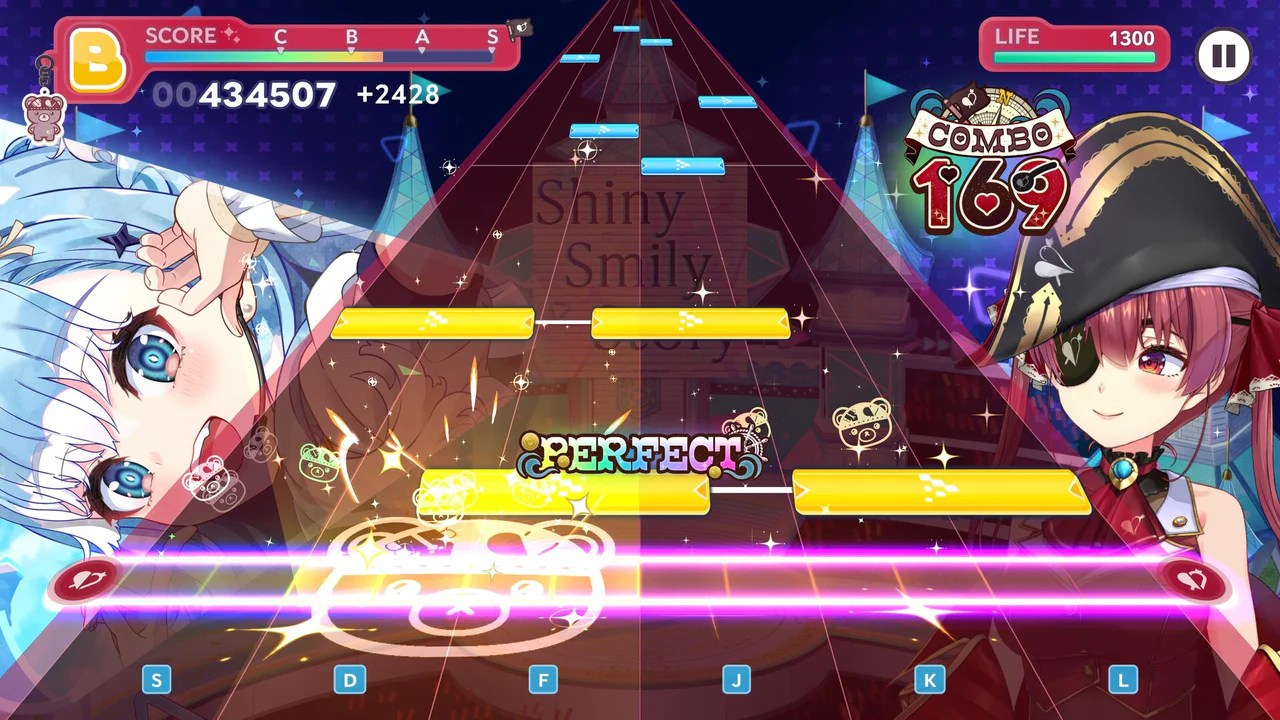
The official game description presents Lives as a full rhythm-game experience built around hololive's own visual material. Some tracks use official music videos, while others can use concert footage to recreate the feel of a live performance. The presentation is therefore more than a static lane over a generic background. Jacket art, performer credit and the source performance are central to each song's identity, which is why the Wiki tracklist keeps the official jacket and creator fields beside every entry.
At launch, the catalog contains 154 songs rather than only the few examples shown in promotional copy. Original songs include group and solo releases, while the cover section includes performances by specific members or units. The tracklist filters those categories without assigning chart difficulty values that are not present in the first-party catalog. Open a song record for performer, lyricist, composer and arranger credits, then return to the live client for the current chart options and score targets.
Connect team growth to rhythm score
hololive Dreams links rhythm score to character organization and training. The official system page tells players to choose a Leader and equip special outfits to improve score, while Leader access comes from completing the corresponding Holomem Quest. This design makes a Live both a note chart and a team check. When progress stalls, compare the active Leader, outfit and Board effects shown by the client before repeating the same song with an unchanged team.
The holomem Board provides four Skill Node types, and Connect Nodes allow cards to raise skill effects. Effect ranges differ between members, so placement should be read from the highlighted Board pattern. No first-party source defines one universal best character or fixed launch tier list. A reliable rhythm setup therefore begins with the member and nodes available in your account, the active quest, and the effect text shown for that version. The character pages link to credited songs so roster browsing can lead directly back to the music catalog.

Use auto-play as an accessibility path
Auto-play is an official rhythm feature, included so players who struggle with manual note input can still enjoy the music. It supports the game's wider audience: hololive fans can watch a favorite performance, follow a quest route and participate in park progression without first mastering demanding charts. Auto-play should be selected from the live options presented by the client, because availability and result handling are runtime details that can change between versions.
For manual play, use the control display shown by the selected platform. Steam screenshots demonstrate keyboard prompts on the rhythm lane, while mobile editions use their touch interface. The first task is to recognize the number and position of active lanes, then watch how note timing reaches the judgment line. Score ranks and life are visible in the performance interface. The exact thresholds belong to the live chart and client, so read them on the song screen rather than transferring a value from another track.
Browse the 154-song catalog efficiently
Start with the song filters when a quest does not require a specific track. Search accepts titles and performers, while category separates Original Song from Cover Song. A song record includes the jacket, performer and available writing credits. Those fields help distinguish similarly titled releases and make it possible to find a member's credited music without scrolling through every jacket. The catalog number is a Wiki browsing aid based on official page order; it is not a difficulty rank.
After choosing a track, return to the live client for chart selection and current rewards. The Wiki does not convert creator credit into gameplay difficulty or invent note counts from promotional footage. That division keeps the music database accurate while the game remains newly launched. When official chart data becomes available through a stable source, it can be added to the same structured record without rewriting the route or replacing the jacket source.
Frequently asked questions
How many songs are in hololive Dreams at launch?
The official English music page contains 154 named records. They are split into Original Songs and Cover Songs and include performer and creator-credit fields where supplied. The stores describe the same launch catalog as more than 150 songs, while the complete first-party page supplies the exact launch count used here.
Does hololive Dreams include auto-play?
Yes. The official store description says players who are not confident with rhythm games can use auto-play. The option is intended to keep the music and broader progression accessible while teams, outfits and Board growth continue to support score-focused play.
Are community-made charts supported?
Yes. hololive Dreams includes an Original Chart function for creating and sharing charts, and players can play charts created by users around the world. Publishing steps and moderation controls should be followed inside the current client because those operational details are not listed on the public catalog page.